


Advanced Client Proofing
End the endless back-and-forth email chains and confusing spreadsheets. PicPick Selection Panels offer a powerful, intuitive platform for sharing organized folders with clients so they can proof, select, and comment on their photos effortlessly.
Built for high-volume studios, our panels support massive file uploads while preserving your exact local folder hierarchy. Clients are greeted with a beautiful, fast-loading masonry layout featuring a high-resolution lightbox for pixel-perfect reviewing.
Stop chasing clients for their final choices. Set clear rules, automate reminders, and let the software handle the entire proofing lifecycle from first view to final submission.

Beautiful, Customizable Themes
Your work is unique, and your delivery should be too. PicPick Panels are not rigid; they adapt entirely to your brand's aesthetic.
Choose from over 20+ professionally designed visual themes built right into the platform. Whether you prefer a pitch-black dark mode for dramatic commercial shoots, a light and airy minimalist grid for weddings, or dynamic masonry layouts, you can change the entire look and feel of your panel with a single click.
The Ultimate Proofing Experience
Panels are designed to give you complete control over the proofing process while offering a frictionless, enjoyable experience for your clients.
- Nested Folders: Preserves your original folder structure (e.g., Morning / Ceremony / Reception).
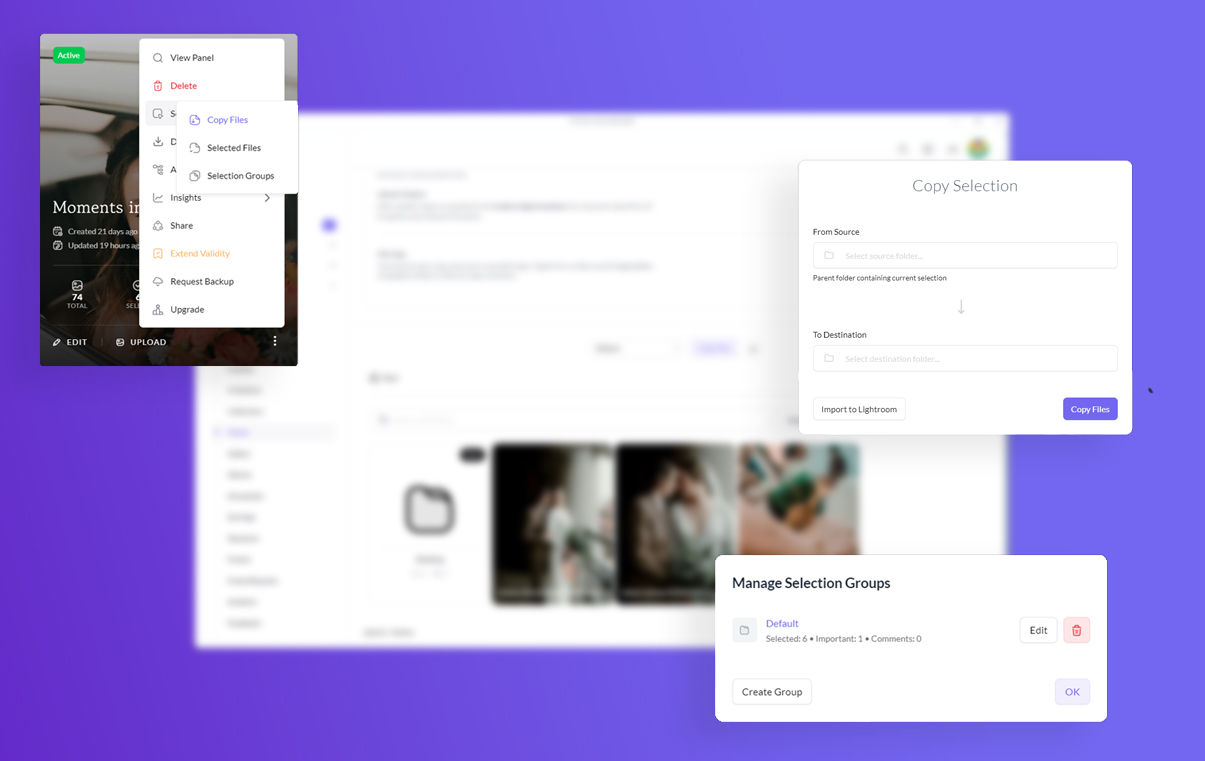
- Selection Groups: Create multi-tier selections (e.g., "Choose 50 for Album", "Choose 10 for Prints").
- Strict Limits: Enforce precise minimum and maximum limits (by total or by group) so clients can't submit incomplete selections.
- Client Feedback: Enable image-level comments for retouching notes and a "Mark as Important" starring feature.
Designed for Every Discipline
PicPick Panels are incredibly versatile, dynamically adapting to fit the specific workflows of various photography niches.
- Wedding Photographers: Ask couples to select exactly 100 photos for their main album, and 20 photos for parent prints, ensuring they meet the required quotas before submitting.
- Commercial & Fashion: Share unedited RAW/JPG proofs. Allow creative directors to leave specific retouching notes (e.g., "Remove blemish," "Crop tighter") directly on the images via the comment tool.
- Portrait Sessions: Present a gallery of watermarked images. Let the client pick the 10 shots included in their package, and easily upsell any additional selections they make.
Advanced Controls & Security
Protect your unedited work, prevent unauthorized downloads, and ensure clients follow your production timeline with strict access controls.
-
Secure 4-Digit PIN & Password protection for private viewing
-
Automated expiry dates to enforce client selection deadlines
-
Sync directly from Google Drive or Dedicated Cloud Storage
-
Toggle high-res download permissions globally or per-folder
Post-Selection: A Frictionless Workflow
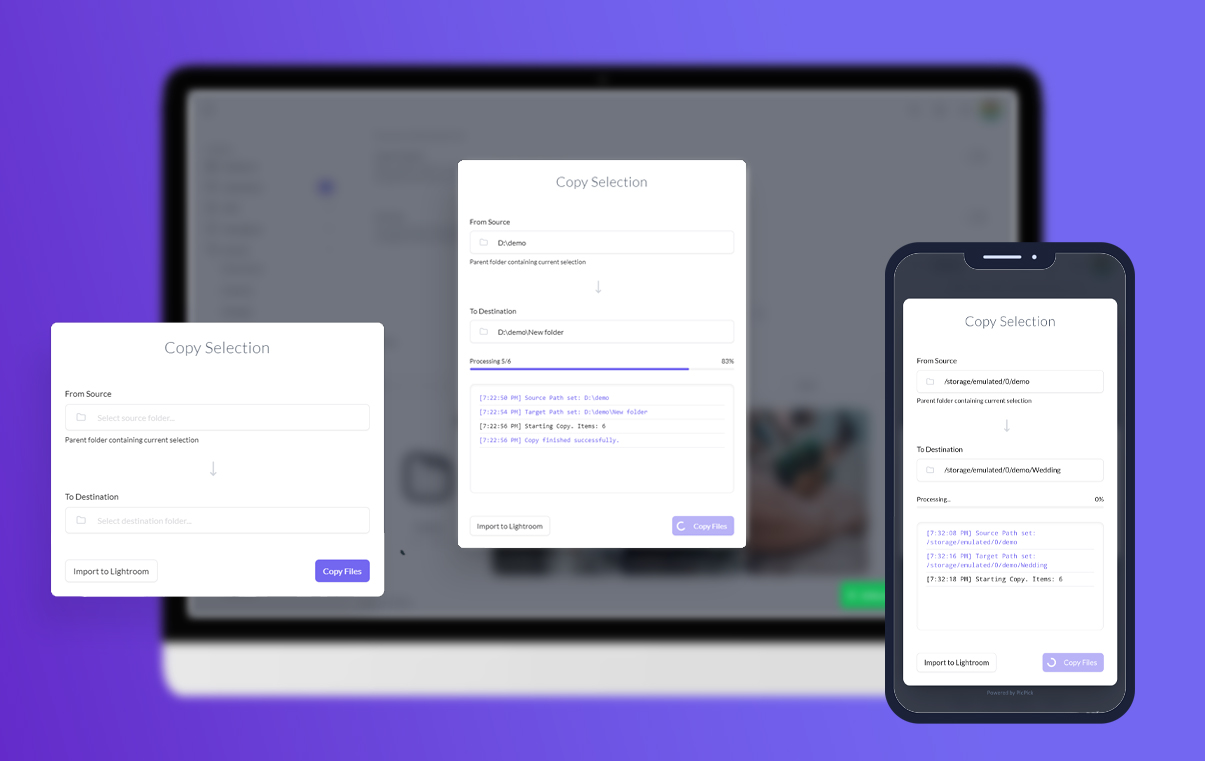
The real magic happens after the client clicks "Submit." Say goodbye to manually searching through hard drives to find the photos your client selected.
You receive an instant notification detailing exactly what was chosen. Using PicPick's desktop utilities, you can export a comma-separated list of filenames for Lightroom, or use our One-Click Copy Tool to automatically copy the high-res original files from your source folder directly into a new "To Edit" folder on your local machine.
What our users say
See how PicPick Panels are streamlining post-production workflows for busy studios.

“The selection limits and groups feature is a lifesaver. My clients now know exactly how many photos they need to pick for their album. Plus, swapping to the dark masonry theme makes my commercial work look incredibly premium. The one-click copy tool saves my editors literally hours of manual file hunting.”
David Chen
Commercial Portrait Photographer
Stop losing time on manual proofing
Create your first selection panel today and experience how effortless client approvals can be.
-
No credit card required
-
7-Day free trial